Welcome to XnonymouX Blog

Showing posts with label Internet Tricks. Show all posts

Saturday, 4 May 2013

How To Send Friend Request on Facebook When you Are Blocked

By on 00:42
How To Send Friend Request on Facebook When you Are Blocked ?

If your account is temporarily blocked from sending friend requests, it may be because friend requests you’ve sent have gone unanswered or been marked as unwelcome. In the future, you should send friend requests to people you have a real-life connection to, like your friends, family, coworkers, or classmates.

Today i am going to Show you How To Send Friend Request on Facebook When you Are Blocked ?

1. First you need a email account of person that you want to send the request. You can easily get from his profile or try other methods.

2. Now go to Friend option and click on the Find Friends Option or Open this URL https://www.facebook.com/?sk=ff
 

                                        How To Send Friend Request on Facebook When you Are Blocked1
3. now enter your friend email id ( Hotmail , Google, yahoo etc.) and click on the Find Friend option then you have option for Add friends.


                                            How To Send Friend Request on Facebook When you Are Blocked2

4. if you want to add more people then go to Other tools menu in down select your option. Like if you want to add people from
                                               How To Send Friend Request on Facebook When you Are Blocked3
5. Like if you want to add people from  Microsoft Outlook / Outlook Express / Windows Contacts/Apple ID or Thunderbird, so click on the Upload contact file option and upload your contact file.
                                            How To Send Friend Request on Facebook When you Are Blocked4

6. if you are not using these email services then open a notepad and write all the email addresses to your friends separated with commas (,) and name the notepad file as yourdesiredname.vcf , then upload it and send your friend request.

Enjoy your friend request. but not send the friend request the people that you don’t know.

Hope you like my post.How To Send Friend Request on Facebook When you Are Blocked. Please Share with others.


Thursday, 2 May 2013

How to Use Whatsapp on PC for Windows and Mac

By on 00:00

Guys as you know Whatsapp is the most Popular Messanger available in the Market for Mobile Phones.

Unfortunately if you dont own a Smart phone then you might not be able to use whatsapp. But don't worry today we Will learn How to use Whatsapp On PC as well.
You can Use it On both Windows and Mac.


Let us See How to Use Whatsapp On Windows and Mac PC.

To Run Whatsapp on Pc, We will Require Android Emulator, Android Emulator Helps us to Run Whatsapp on PC. 

Step 1: Youwave And Bluestack Are the Two Android Emulator which enable us to Run Whatsapp or any other Android App on PC.

Step 2: If you Go for Bluestack then Download and install it, then run the Bluestack and Click                 

on " Apps "
Then Click on the Tab " Social " and select " Whatsapp " and Install it.


Step 3: If you Go for Youwave which I am Using On My PC then just download  and install.
Now download Whatsapp.apk and move the downloaded file to PC directory.

             To Check PC's Directory, Open Youwave click on help > Instruction. Now move your           
    whatsapp.apk file in to that directory . Then Click on View then  Redraw Icons. 

Now You will see Whatsapp icon .


After Installing Whatsapp on Youwave or Bluestack you have to enter Mobile number which is not used earlier For Whatsapp account.  Then they will take 5 Minutes to verify and will send you Code.
Enter that code and thats all.


Note :  You won't Have any , You have to manually Enter Contacts and Save them.

I hope This tutorial will help you .

Sunday, 31 March 2013

Top 5 sites to create Resume Online

By on 06:42

Online free Resume builder sites, In this sites you can create your professional Resumes. Online Resume creator site provides out standing quality of template lay outs. While adding information it shows key words suggestion tool. To Create Resume you need to sign up first, After you can add information to your resume like education, skills etc.

#1. Myresumeonline


Friday, 22 February 2013

How to Secretly Hack Into, Switch On, & Watch Anyone's Webcam Remotely

By on 22:53
———————————————————————————————
How to Secretly Hack Into, Switch On, & Watch Anyone's Webcam Remotely
———————————————————————————————

Welcome back ,

Like in my last article on remotely installing a keylogger onto somebody's computer, this guide will continue to display the abilities of Metasploit's powerful Meterpreter by hacking into the victim's webcam. This will allow us to control the webcam remotely, capturing snapshots from it.

Pic : http://bit.ly/Yrfb0G

Why exactly would you want to hack into somebody's webcam? Maybe you suspect your significant other of having a fling. Or, maybe you're into blackmailing. Or, maybe you're just a creep. But the real purpose is to show just how easy it is, so you're aware that it can be done—and so you can protect yourself against it.

Pic : http://bit.ly/XQsdF5


Unlike just installing a command shell on the victim computer, the Meterpreter has the power to do numerous and nearly unlimited things on the target's computer. The key is to get the Meterpreter installed on their system first.

Pic : http://bit.ly/Zx6icF

So, now let’s fire up Metasploit and install Meterpreter on the victim's system. Once we have done that, we can then begin to view and capture images from their webcam.

Step 1: List the Victim's Webcams

Metasploit's Meterpreter has a built-in module for controlling the remote system's webcam. The first thing we need to do is to check if there is a web cam, and if there is, get its name. We can do that by typing :

meterpreter > webcam_list

If he/she has a webcam, the system will come back with a list of all the webcams.

Step 2: Snap Pictures from the Victim's Webcam

Now that we know he/she has a webcam, we can take a snapshot from the webcam by typing :

meterpreter > webcam_snap

The system will now save a snapshot from her webcam onto our system in the directory /opt/framework3/msf3, which we can open and see what's going on.

Pic : http://bit.ly/15AMmGq

The quality of the image saved all depends on your victim's webcam and surroundings.

Step 3: Watch Streaming Video from the Victim's Webcam

Now that we know how to capture a single snapshot from the victim's webcam, we will now want to run the webcam so that we can watch a continuous video stream. We can do this by typing :

meterpreter > run webcam -p /var/www

This command starts his/her webcam and sends its streaming output to /var/www/webcam.htm.

How to Protect Yourself from Webcam Intrusion :

So, what can you do to make sure no one is peeking in on your habits in front of the computer? The easiest solution—cover your webcam up. Some laptops with built-in webcams actually have a slide cover you can use.

Pic : http://bit.ly/Wf27Ml

If that's not the case, a piece of non-translucent tape should to the trick, unless you want to buy one of these or these things. And if you still have one of those old-school USB webcams, simply unplug it.

We will continue to explore fun ways we can use the Meterpreter in the near future, so make sure to come back for more!

Wednesday, 13 February 2013

All Alive Proxies

By on 21:15

Proxies


Pakistan, India, USA, Indonesia, China, Brazil, Japan, Germany, Iran, Iraq and more Alive Proxies
Proxy      :     Port
222.124.33.33:80
223.19.105.185:80
217.219.115.133:80
203.188.246.82:80
201.0.203.27:80
200.5.74.3:8080
212.34.227.42:80
217.219.115.140:80
222.124.214.60:80
201.159.96.14:80
202.105.233.40:80
196.213.214.34:80
196.21.0.99:80
201.75.81.126:80
196.21.0.98:80
196.21.0.97:80
196.205.160.3:80
195.187.142.233:80
190.26.216.235:3128
194.170.16.75:8080
194.117.216.75:80
195.62.49.82:80
190.79.92.196:8080
193.137.1.20:80
192.149.119.82:80
194.1.207.75:80
201.240.112.160:80
201.251.59.1:80
121.26.252.104:80
186.5.31.165:8080
194.170.16.75:80
190.29.22.247:8080
190.3.106.166:80
190.235.121.39:80
201.248.65.111:80
190.211.132.65:8080
190.207.9.103:80
189.10.4.2:80
189.1.162.110:80
190.236.91.5:80
190.253.217.54:80
190.249.188.220:80
190.226.249.109:80
190.128.222.114:80
190.158.248.250:3128
177.19.134.66:8080
189.90.132.218:8080
177.46.33.81:8080
118.97.16.182:8080
178.168.35.231:3128
92.50.175.214:8080
103.22.248.100:3128
190.210.108.177:8081
187.49.50.71:3128
189.104.214.133:80
190.0.244.190:8080
187.62.212.178:8080
187.50.174.11:80
188.40.93.116:3128
189.114.111.190:8080
190.105.161.208:3128
187.36.8.58:80
184.154.217.249:80
178.20.232.170:80
187.105.34.213:3128
188.126.133.2:80
187.107.99.11:3128
187.125.37.150:8080
121.243.47.242:6515
187.13.20.31:80
189.36.135.51:3128
187.11.237.196:3128
187.111.89.243:80
186.42.183.6:80
164.77.196.75:80
184.82.236.76:80
113.57.230.2:80
180.95.19.77:80
186.235.237.157:80
184.169.138.111:80
74.63.209.209:80
106.187.37.146:80
108.52.61.19:80
107.22.227.2:80
67.23.8.46:80
201.217.57.108:80
173.0.59.151:80
64.37.51.33:80
216.17.101.11:80
210.245.81.67:80
187.35.172.12:80
41.205.208.28:80
189.112.98.209:80
186.215.68.51:3128
186.194.7.185:8080

How To Place Facebook Chat On Firefox Sidebar

By on 21:13

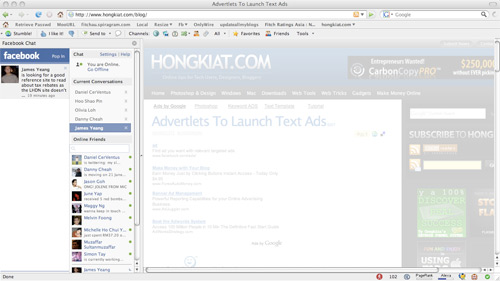
Facebook Chat is cool, at least it allows you to send instant messages to online Facebook contacts.If you are using Firefox, you can place the Facebook Chat at the sidebar.
  • Look for Bookmarks on the top navigation. Select Organize Bookmarks…
  • Click New Bookmark... tab and enter the following: 
  • Name: Facebook Chat
  • Location: http://www.facebook.com/presence/popout.php 
  • Check Load this bookmark in sidebar.
  • Launch the Firefox sidebar, click Facebook Chat and start chatting with your Facebook contacts within Firefox.

Make Multiple Facebook Accounts with Same Email

By on 21:12

 
Assalam o Alaikum, today i am sharing a trick for Facebook.Facebook is the most famous Social Network Website, doesn't not allow multiple accounts with the same e-mail address, but it's possible to do that with a simple Gmail trick by using the same email address. This trick is caused by a small bug in Gmail because it ignores the dot (.) so the email mmmm@gmail.com is the same m.mmm@gmail.com or mmm.m@gmail.com and so on.
Steps to do this:
  • Get a gmail account, then Signup for a New Facebook account and add the dot (.) in the email address.
  • For Example :
mmmmmmm@gmail.com
mmm.mmmm@gmail.com
  • Keep changing the dot (.) position every time you want to create a new Facebook account (e.g : mmm.mmm@gmail.com )
  • Its done now...

Sunday, 10 February 2013

How to Grant Access to Others to Your Gmail Account Without Sharing Password

By on 01:00
Gmail is one of the most popular mailing service today. It gives many facilities to it's users. such as
Use Gmail Without Internet Connection
Schedule your own time, and send emails in Gmail
Remove Spam emails automatically in Gmail


In this list now gmail gives one of the greatest facility to its users. Its called as grant access. This means you can give grant access to your gmail account to a friend, without sharing your password.

Most important thing is in this, other person can't change any setting or password of your gmail account. And also can't chat from your account. This feature 
only allows the other person to 
read inbox mails, 
can delete read mails, 
and can send mails from your account. 
More than this, particular person can't do any changes in your gmail account. 


How to Grant Access to Others to Your Gmail Account Without Sharing Password


How to active this feature?

Login to your Gmail account


Go to Settings


How to Grant Access to Others to Your Gmail Account Without Sharing Password


In Setting, Click on Account and Import tab

How to Grant Access to Others to Your Gmail Account Without Sharing Password


Now go to Grand access to your account section
Then click on Add another account

How to Grant Access to Others to Your Gmail Account Without Sharing Password


Now a pop-up window will appear, in that window type the particular person's email address that you gonna give the access.
Then click on Next

How to Grant Access to Others to Your Gmail Account Without Sharing Password

In the next appearing window click on Send Emails to grant access

How to Grant Access to Others to Your Gmail Account Without Sharing Password

Now particular person will get an email to conform the grant access. 
He/She should conform the grant access to access your account.


How to conform the grant access?

He/She can conform by clicking accept this request link

How to Grant Access to Others to Your Gmail Account Without Sharing Password


That's all, you have done.
After 30 minutes the particular person can log into your Gmail account.


How to login?

The particular person have to login to his/her gmail account and should click on his/her name in the top-right of the window.

Now he/she can see another new email id with the word (delegated), below their email id.

If he/she click on that new email id, they can access to your Gmail account without password require.
Note:
If he/she send an email to anyone from your account, the mail receiver will get the particular person's email id in sent by section. So he/she cannot misuse your email account, you don't need to worry about misuses !!!

Download Google Chrome Portable Version 24.0.1

By on 00:47

Google Chrome is the best and fastest web browser among web browsers software. Most of us use Google Chrome including me as our web browser for fastest access in the web. It has more than 310+ million users worldwide. If you are really a fan of Google Chrome and if you are very much used to it, then certainly you may wish to carry it wherever you go.


Download Google Chrome Portable Version 24.0.1
Now Google Chrome has released the latest version of Google Chrome portable version 24.0.1312.57. This latest version of Chrome portable is designed simply and stylish. You can have your,
Favorite bookmarks
Saved passwords
All History and everything that you want at any time. 

You can simply install Chrome Portable setup file into your USB pen drive, and start web browsing from anywhere and from any PC. Portable Chrome is having all the features which you get in a usual Chrome PC version.

Friday, 1 February 2013

Make ur Windows Genuine using notepad

By on 07:59
Make ur Windows Genuine using notepad!!!!


1. Copy and Paste the following code in the Notepad. Windows Registry Editor Version 5.00
[HKEY_LOCAL_MACHINE\SOFTWARE\Microsoft\Windows NT\CurrentVersion\WPAEvents] "OOBETimer"=hex:ff,d5,71,d6,8b ,6a,8d,6f,d5,33, 93,f d "LastWPAEventLogged"=hex:d5,07 ,05,00,06,00,07, 00,0 f,00,38,00,24,00,fd,02 [HKEY_LOCAL_MACHINE\SOFTWARE\Mi crosoft\Windows NT\CurrentVersion] "CurrentBuild"="1.511.1 () (Obsolete data - do not use)" "InstallDate"=dword:427cdd 95 "ProductId"="69831-640-1780577-45389" "DigitalProductId"=hex:a4,00,00,00,03,00,00,00 ,36, 39,38,33,31,2d,36,34,30,2d,\ 31,37,38,30,35,37,37,2d,34,35, 33,38,39,00,5a,00,00 ,00,41,32,32,2d,30,30,30,\ 30,31,00,00,00,00,00,00,00,00,0d,04,89,b2,15,1b,c4 ,ee,62,4f,e6,64,6f,01,00,\ 00,00,00,00,27,ed,85,43,a2,20, 01,00,00,00,00,00,00 ,00,00,00,00,00,00,00,00,\ 00,00,00,00,00,00,00,00,00,00,00,31,34,35,30,34,00 ,00,00,00,00,00,00,ce,0e,\ 00,00,12,42,15,a0,00,08,00,00, 87,01,00,00,00,00,00 ,00,00,00,00,00,00,00,00,\ 00,00,00,00,00,00,00,00,00,00,00,00,00,00,00,00,00 ,94,a2,b3,ac "LicenseInfo"=hex:9e,bf,09,d0,3a,76,a5,27,bb,f 2,da ,88,58,ce,58,e9,05,6b,0b,82,\ c3,74,ab,42,0d,fb,ee,c3,ea,57, d0,9d,67,a5,3d,6e,42 ,0d,60,c0,1a,70,24,46,16,\ 0a,0a,ce,0d,b8,27,4a,46,53,f3, 17

2. Save the file with the .reg extension.

3. If you run the file means it will ask you the confirmation to add the value to your Registry.

4. Press Yes.

5. Reboot your System.

6. Start Downloading from Microsoft Site.

Saturday, 29 December 2012

How to boost 3g Signal of your USB Dongle

By on 02:59

Hello my cute little friends!! Today I gonna give you a different solution for your internetproblem.
I just thought how many people worried about their signal strength of Dongle and always mention mothers of ISPs (Internet Service Provider) heh hee!. 
I can read your mind....!!!!                     don't panic I’m just kidding..
I figured out a solution for it. here is another silly trick came out from my little brain.... You can boost your 3G signal from this thing. Try it and speed up your Dial-Up Connection
You don't wanna get your hands dirty with any soldering stuff, Hard work or you don't need any expensive stuff. Let’s see how it works !!


What we need?

6 Pieces of Single Core wires ( 1.2mm - recommended )
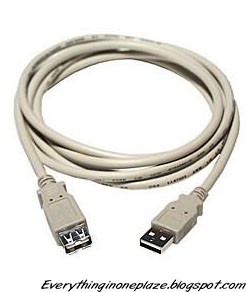
USB Extension cable ( 3 meter - recommended ) Too long cause, lower the power for dongle
HSDPA Dongle :)


  •  6 Pieces of Single Core wires and USB Extension Cable
    Boost-3G-SignalBoost-3G-Signal


    •  Get the USB extension cable 
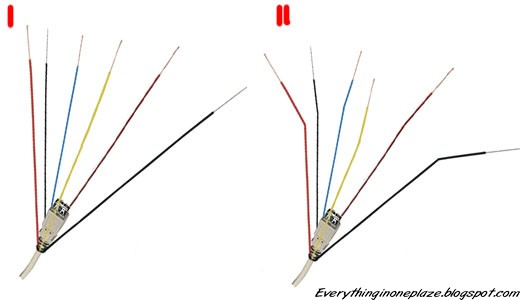
    •  Tie up the wires like this (Don't use too many wires)
    •  Bend the tip of the wires (ii)
    Boost-3G-Signal


    •  Now we are DoNE!! Hang or Stick the Dongle in upper place


    Tips to gain more signal ......!!

    •  Don't place the Dongle in Corners
    •  Don't place the Dongle in a Fully Covered Position
    •  Place It in a better air space
    •  Stick in the wall
    •  Move up your PC near to the window and hang the Dongle in the window :)


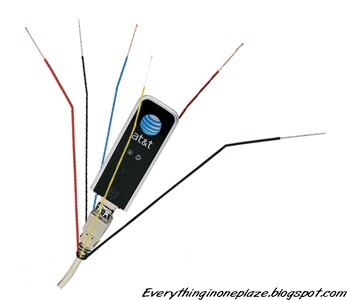
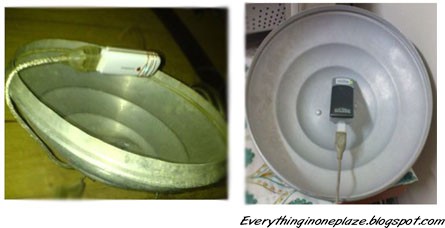
    Here is another Idea If you can Built !!!
    Boost-3G-Signal


    I Hope This post will help you some how...please leave a comment about your ideas